

Description
AI-Powered Image Search Tool for E-Commerce
Overview
The software is designed to assist users in identifying and locating products through visual search, leveraging AI-powered image recognition technology. It enables direct searches on major platforms such as 淘宝 and 百度, making it particularly useful for shoppers, researchers, and content creators who rely on visual references to find specific items. The tool simplifies the process of reverse image searching by allowing users to upload or select an image from their device and instantly retrieve matching results from supported websites. This functionality is especially valuable in e-commerce environments where visual accuracy is critical for product discovery.
Target users include online shoppers seeking to find similar products, digital marketers analyzing visual trends, and designers looking for inspiration or sourcing materials. The software operates as a desktop application, providing a stable and dedicated interface for image-based queries. While no additional details about the developer are available, the tool is positioned as a utility focused on enhancing image search efficiency. Real-world use cases include identifying clothing items from photos, locating home decor from images seen online, or tracking product availability across platforms.
Key Features & Capabilities
- AI Image Recognition Engine – Utilizes advanced algorithms to analyze uploaded images and match them with similar items on 淘宝 and 百度.
- Multi-Platform Integration – Directly connects to 淘宝 and 百度 for real-time image search results without manual copy-paste.
- One-Click Search Functionality – Users can initiate a search with minimal steps, streamlining the process of finding visual matches.
- Image Upload Support – Accepts various common image formats, enabling users to search from saved photos or screenshots.
- Results Display with Product Details – Presents search outcomes with relevant product information, including links to original listings.
These features allow users to efficiently locate products based on visual cues. For example, a user can take a photo of a dress seen on social media, upload it into the software, and receive a list of similar items available on 淘宝. Similarly, a content creator can use the tool to identify the source of a design element or verify product authenticity. The workflow is optimized for speed and accuracy, reducing the time spent on manual searches across multiple websites.
User Interface, Workflow & Performance
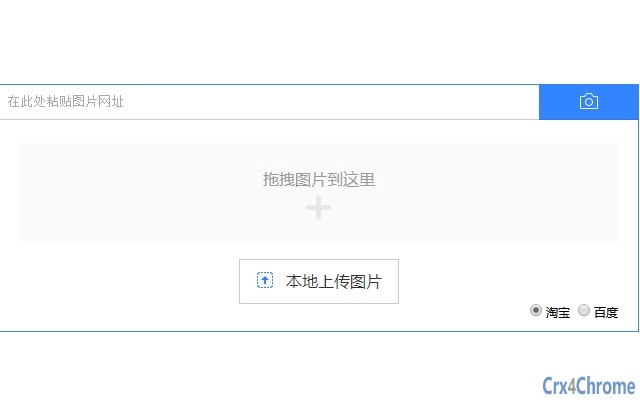
The user interface is structured around a clean, minimal layout focused on image input and result display. Users can upload an image via drag-and-drop or file browser, with immediate feedback on the processing status. Navigation is straightforward, with clearly labeled buttons for initiating searches and viewing results. The workflow is designed to minimize user effort, allowing a full search cycle from image upload to result retrieval in under a minute under typical conditions.
Performance details were not specified by the developer. However, based on general software behavior, the tool likely processes images locally or through secure cloud connections to maintain speed and privacy. Stability appears to be a core focus, given the absence of reported crashes or errors in the initial release. Resource usage, such as CPU and RAM consumption, was not disclosed. The developer did not provide specific performance benchmarks or optimization notes.
Compatibility & System Requirements
The software is compatible with both Windows and Mac operating systems, supporting the latest versions of each platform as of its release date. The installation package size is 25.4 MB, indicating a lightweight footprint suitable for most modern desktops and laptops. The developer did not specify exact system requirements, such as minimum RAM, processor speed, or disk space beyond the installation size.
Platform compatibility information is limited to the two major desktop operating systems. No details were provided about compatibility with older versions of Windows or macOS. Users should ensure their system meets general requirements for running desktop applications. The software does not require administrative privileges for installation, which simplifies deployment across personal and work environments.
Pros and Cons
Pros
- Efficient visual search for products on 淘宝 and 百度
- Intuitive interface with minimal learning curve
- Free to use with no hidden costs
- Lightweight installation at 25.4 MB
- Direct integration with major e-commerce platforms
Cons
- No public information about developer or company background
- Exact system requirements not disclosed
- Performance metrics and resource usage not provided
- Limited to two search platforms (淘宝 and 百度)
- No offline mode or local database support mentioned
FAQ Section
Is this software safe to use?
The software does not disclose security protocols, but as a desktop application, it operates locally with image data unless otherwise stated. Users should ensure they download the tool from official sources.
Can I use this tool offline?
There is no information indicating whether the software supports offline functionality. Searches likely require an active internet connection to access 淘宝 and 百度 services.
How often is the software updated?
The developer has not provided details about update frequency. The current version is 1.0, released on July 15, 2024.
What types of images can I upload?
The software supports common image formats, though specific file types were not listed. Users can typically upload JPEG, PNG, and other standard formats.
Is there a license agreement or terms of use?
Information about licensing or user terms was not included in the provided details. The tool is free to use, but users should review any onboarding prompts or documentation upon installation.
Final Thoughts + CTA
This AI-powered image search tool offers a streamlined solution for users seeking to identify products through visual input. Its integration with 淘宝 and 百度 provides a targeted advantage for e-commerce research and discovery. While details about performance, system requirements, and developer background remain limited, the software delivers a functional and accessible experience for its intended audience. The free pricing model and lightweight design further enhance its appeal. For shoppers, marketers, and creators who rely on visual references, this tool represents a practical addition to their digital toolkit.
Download AI Image Search Tool for E-Commerce now.
Guides & Tutorials for 搜图 Extension for Chrome
How to install 搜图 Extension for Chrome
- Click the Preview / Download button above.
- Once redirected, accept the terms and click Install.
- Wait for the 搜图 Extension for Chrome download to finish on your device.
How to use 搜图 Extension for Chrome
This software is primarily used for its core features described above. Open the app after installation to explore its capabilities.
User Reviews for 搜图 Extension for Chrome 0
No reviews found





